
As the AI race intensifies, tech companies are expected to increase AI investments to $300 billion in 2025. Across industries, executives aren’t just racing to be first in AI achievements, they are competing not to be last. That mindset of adding AI on top of systems…
The Rise of Mixture-of-Experts: How Sparse AI Models Are Shaping the Future of Machine Learning
Mixture-of-Experts (MoE) models are revolutionizing the way we scale AI. By activating only a subset of a model’s components at any given time, MoEs offer a novel approach to managing the trade-off between model size and computational efficiency. Unlike traditional dense models that use all parameters…
Utilizing AI for Better Business Insights: Minimize Costs, Maximize Results
Artificial intelligence (AI) transforms companies’ operations, offering unprecedented opportunities to uncover actionable insights that drive efficiency and measurable results. Companies like GE Aerospace already use AI to analyze complex datasets, improving decision-making and operational performance. By leveraging AI, organizations can analyze vast amounts of data, identify…
Why AI-Powered Mapmaking is Essential to the New Era of Software-Defined Vehicles
The automotive industry is undergoing one of the most profound transformations in its history. Once defined by mechanical engineering and horsepower, today’s vehicles are increasingly shaped by code. We’re entering the era of software-defined vehicles (SDVs) where the intelligence of the car comes less from the…
Sriram Nagaswamy, Executive Vice President at FourKites – Interview Series
Sriram Nagaswamy, Executive Vice President at FourKites is passionate about building world-class teams, with close to 19 years of experience in building and leading technical and research-oriented teams. His strengths include in-depth technical expertise, a strategic mindset, managing global team engagements to improve operational results, and…
How WordPress Agencies Can Improve Site Building Efficiency — Speckyboy
WordPress Agencies and freelancers frequently juggle multiple projects. For example, building two or more websites at once. It’s not uncommon to find yourself repeating the same processes. It slows progress and places more burden on your schedule.
Efficiency is the antidote to this kind of chaos. It’s all about finding the right tools and techniques for getting more done with less effort. Thankfully, there are plenty of options out there for busy developers.
The WordPress ecosystem offers some invaluable tools. There are themes and plugins aimed at speeding up your workflow. And even the Block Editor can boost your efficiency – if you know where to look. Oh, and there’s also the rise of artificial intelligence (AI).
We’re all about improving the site-building process without cutting corners. Let’s explore some ways to make it a reality.
Start Fast With a WordPress Blueprint
Do you find yourself using the same theme and plugins for every project? A WordPress blueprint can save you from repeatedly downloading and installing these items.
The term “blueprint” can mean different things. Here, we’re talking about a collection of WordPress-related goodies that provide a foundation for your projects. That puts everything you need to start a site build within reach.
For example, you could combine your trusty starter theme with several plugins. You might include plugins that cover form creation, SEO, and your favorite custom block suite. From there, you can deploy your blueprint when starting a new project.
There are a few ways to create a blueprint. WordPress has a collection of common blueprints for use with its Playground environment (it also works with WP-CLI). You can also create custom configurations. The advantage is that you’ll always have the latest theme and plugin versions.
In addition, LocalWP is a local WordPress development environment with blueprint support. You can create a blueprint site that includes your favorite theme and plugins. Once that’s set up, you can create new sites based on your blueprint. It’s handy for those who like to build locally.
The right blueprint will get your project off to a blazing start. Configure it once and get to work.

Use Block Patterns Everywhere
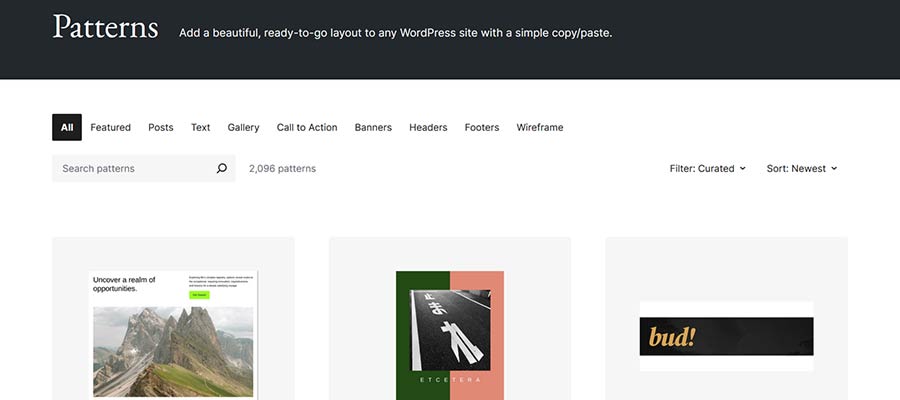
Block patterns are a tool to speed up building page layouts. Readymade components like calls to action, pricing tables, or galleries can be added to your page. Block theme users benefit from site header and footer patterns as well.
That works well on a per-site basis. However, you can also use them across websites. For instance, you can copy and paste from the official Block Pattern Directory.
But what if you want to use your own custom patterns on multiple sites? There are a few possibilities:
- Create and store patterns locally: Build a local WordPress site to house your custom block patterns. You can copy and paste from the local site into your new projects.
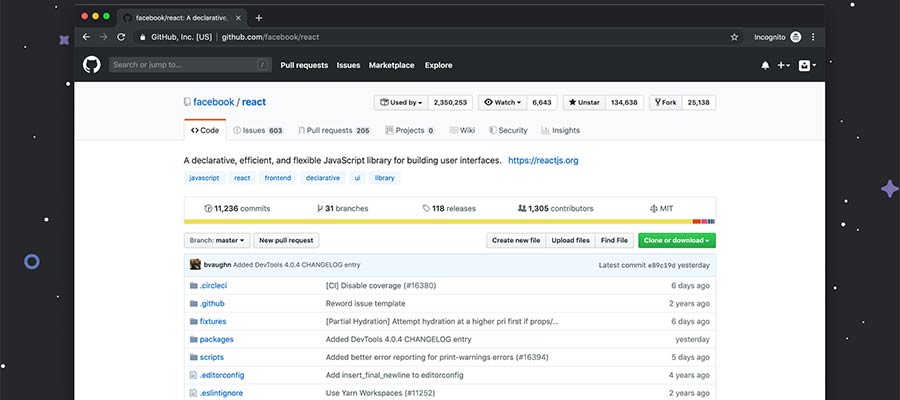
- Store custom patterns on GitHub: Copy your favorite patterns and create GitHub Gists for them. That provides a centralized place to access your patterns and share with others. Copy your pattern’s block code, then paste it into your site’s Block or Site editor.
Patterns can consist of any combination of blocks you like. For best results, keep the styling to a minimum. That allows you to customize the patterns to match your project’s style.
Your custom patterns can be used on every site in your portfolio. You’ll benefit from a faster page-building experience.
Keep Custom Code Snippets Handy
Building WordPress websites often means adding custom code. Perhaps you tweaked your theme or changed a plugin’s output. The odds are you’ll need to use those items again. Why not organize them?
Like block patterns, you can build an archive for your code snippets. GitHub is once again a solid option for keeping them on hand. But you can also store them in local files or anywhere that gives you quick access.
You might also turn some snippets into a custom plugin. It’s helpful for code that performs common tasks. You can install a plugin rather than repeatedly hacking at your theme’s functions.php file.
Pro tip: Don’t throw all your snippets into a single plugin. Each plugin’s functionality should be grouped by niche. For example, you might build a plugin that includes WooCommerce tweaks.
Also, have a plan for maintaining any custom plugins you build. You may need to add or edit their code in the future.
Keeping track of code snippets makes development that much easier. And it beats searching your past projects for that one feature you built.
Let AI Do Some of the Hard Work for You
Apps using artificial intelligence (AI) are also a boon to WordPress professionals. They make quick work of common tasks, including complex ones.
Their ability to generate and troubleshoot code will save you time. Use them to build plugins, squash bugs, and research different approaches. They also serve as a handy reference for WordPress hooks and filters.
The convenience of these tools goes beyond code. You can also use AI to handle “busy work” that gets in the way of progress. Here are a few ideas:
- Convert a spreadsheet to an HTML table;
- Create a summary of a document or blog post;
- Generate charts based on custom data;
- Generate starter content for a page (great for prodding clients to finish content);
It’s easy to get bogged down with tedious tasks. Experiment with AI tools to improve efficiency and your sanity. You’ll have more time to focus on the important stuff.

Streamline Your WordPress Site Building Workflow
Most often, being efficient isn’t about taking one big step. Rather, it’s a combination of little things that result in a more streamlined approach. The ideas above can get you started on that path.
The trick is to identify the areas of your workflow that are repetitive or slow you down. From there, you can take steps to improve them. It might be a matter of outsourcing a time-consuming task to AI. Then again, you might benefit from better organizational skills. Either way, there are solutions to help.
Improved efficiency allows you to level up your business. Do more, get paid faster, and avoid being tripped up by the unexpected. It’s a great way to turn your WordPress agency into a well-oiled machine.
Related Topics
Top 10 developer experience insight tools
Developer experience (DevEx) is more than just a buzzphrase. With the rise of complex tech stacks, remote-first teams, and continuous delivery, developers’ work processes have become more complex. Poor DevEx leads to slower deployments, burnout, and increased turnover. Great DevEx, on the other hand, boosts productivity,…
Sam Altman: OpenAI to keep nonprofit soul in restructuring
Ever wondered what happens when a company trying to build a ‘brain for the world’ needs to grow up, fast, without selling its soul? Well, OpenAI has just given us a peek as it pledges to keep its nonprofit core amid broader restructuring. OpenAI CEO Sam…
The Sequence Knowledge #535: Coding Benchmarks
Arguably, the most fascinating benchmark category in AI….