
Perplexity and OpenAI announced in initiatives in that area….
20+ Best Resume Templates for Microsoft Word in 2025 — Speckyboy
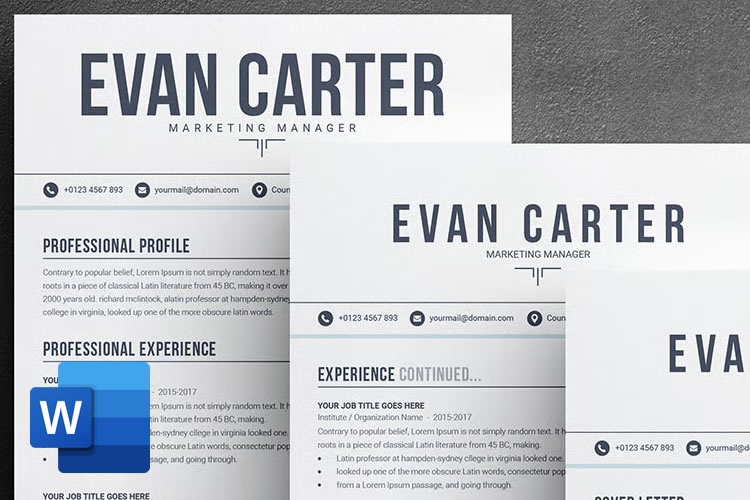
Most designers would probably rather use Figma, Photoshop, or InDesign for creating a resume. That makes sense. Those applications give you more control over the layout and typography. But sometimes Word is just easier. It’s quick to open, easy to share, and doesn’t need any special software to view.
Word files are practical. They’re what most employers expect. And when used well, they look polished and professional. They’re clean, well-structured, and often thoughtfully designed.
They don’t try too hard. Fonts are balanced. Spacing is right. Sections are clear. Whether you’re applying to an agency or sending a PDF to a client, these Word resume templates give you a reliable base to build on and add your own creative flair.
Note: All of these resume templates are in Word format. But if you prefer working in a more creative application or need extra customization, you may also be able to edit them in Figma, Photoshop, InDesign, Canva, or Illustrator, depending on the template you choose.
Minimal Resume Templates for Word
These minimal templates will give you a clean foundation to build on. With no clutter or decoration getting in the way, these resume layouts focus on type, spacing, and structure.
They’re great for creatives who want full control over the design but still need a clear starting point. The layout is already solid, so it’s easy to adjust fonts or move sections around without breaking the template.
Modern Resume Templates for Word
These modern-style templates are helpful for designers who want a layout that already has a bit of visual rhythm. These files make smart use of alignment, modular blocks, and white space.
There’s room for short descriptions, links, and personal branding. For creatives who don’t want to build a resume layout step by step in Figma or InDesign, these Word templates offer a solid base.
Colorful Resume Templates for Word
These templates use color in a way that feels intentional and controlled. As a designer, you probably have strong opinions about color. These layouts give you something to react to and refine.
You can easily edit the palette to match your brand or remove it entirely if needed. Color is used to guide the eye and break up sections, not to decorate for decoration’s sake.
Corporate & Business Resume Templates for Word
These templates give you a framework that fits a business or corporate environment without feeling generic. You still get a well-organized layout with careful spacing and strong hierarchy, but without the creative styling that might distract in a more formal setting.
These templates are especially useful if you need to send your resume to a recruiter or upload it to a system that favors traditional formatting.
Why Word Still Works for Designers
Word isn’t flashy, but it gets the job done. You can open a file, make quick edits, and have something ready to send in minutes.
Hiring managers are used to Word and PDF resumes. They don’t need to ask how to open the file or deal with broken formatting.
Word always holds its structure. A well-designed template won’t fall apart when you update it. That matters when you’re working fast or applying for multiple roles.
You can always move your layout into InDesign or Figma later. But starting in Word keeps things simple. It gives you a working layout without any extra layers.
Conclusion
These templates aren’t meant to do the job for you. They’re just a starting point. You still need to put in the work. Write clearly. Keep it honest. Make sure your information is accurate and easy to follow.
You don’t need to design anything flashy. Clean beats clever. Let your experience speak for itself. Pick a layout that suits your work, adjust the text, export it to PDF, and that’s it, you’re ready to send!
Related Topics
The Layout Maestro Course
Layout. It’s one of those easy-to-learn, difficult-to-master things, like they say about playing bass. Not because it’s innately difficult to, say, place two elements next to each other, but because there are many, many ways to tackle it. And …
The Layout Maestro Course originally published on…
AI is rewriting the rules of the insurance industry
Despite its traditionally risk-averse nature, the insurance industry is being fundamentally reshaped by AI. AI has already become vital for the insurance industry, touching everything from complex risk calculations to the way insurers talk to their customers. However, while nearly eight out of ten companies are…
Scroll-Driven Sticky Heading
I was playing around with scroll-driven animations, just searching for all sorts of random things you could do. That’s when I came up with the idea to animate main headings and, using scroll-driven animations, change the headings based on the user’s scroll position.
Scroll-Driven Sticky Heading originally…
IBM Power11 targets enterprise AI adoption with zero-downtime architecture
IBM’s Power11 enterprise servers address a persistent challenge in enterprise computing: how to deploy AI workloads without compromising the rock-solid reliability that mission-critical applications demand. Announced on July 8, 2025, the Power11 reflects IBM’s bet that enterprises will prioritise integrated solutions over the current patchwork of…
The Friday Roundup – Lighting Tips and Editing Tricks
4 Simple Video Lighting Tricks That Make a Big Difference When I first started shooting videos indoors in a space setup as a studio, I figured all I needed was to work out how to pull a three point lighting setup together and we were good…
Capture Every Angle in 4K with the PTZOptics Action Bundle for Sports Streaming

Upgrade your sports video production with the PTZOptics Action Bundle featuring 4K PTZ and fixed cameras plus the SuperJoy controller for seamless control. Looking to level up your sports streaming workflow? The PTZOptics Action Bundle delivers stunning 4K video coverage with a flexible, multi-camera setup—ideal for schools, arenas, and live sports broadcasters.
|
1x Move 4K 12x PTZ Camera $2,199.00 2x Studio 4K 12x Fixed Camera $2,638.00 1x SuperJoy Controller $1,429.00 Subtotal $6,266.00 Savings -$855.00 BUNDLE TOTAL $5,411.00 |
|
 |
The Power of PTZ Stay focused on the action with the included Move 4K 12X, which gives you the flexibility to cover the entire field, court or diamond with studio-quality camera controls and no on-field camera operator. The Move 4K offers built-in auto-tracking capabilities – no need to run software on another computer |
|
Fixed Camera Creativity Never miss a scoring shot with your Studio 4K fixed cameras capturing the action at each goal line, net or basket. The power of 12K optical zoom helps you grab those up-close action shots and player reactions. |
 |
 |
Connect Anywhere Both the Move 4K and Studio 4K are Hive-Linked™ (currently in Beta) to our easy-to-use online platform, Hive Studio, delivering future-ready connectivity and control from around the world. Both also feature SDI, HDMI, USB and IP output and come native with NDI® HX3. |
|
Superior Control The SuperJoy joystick controller offers an intuitive, tactile interface, simplifying and streamlining even the most complex production setups. Your SuperJoy controller can be set up anywhere on a network to gain PTZ camera controls with a low-latency, live video preview. |
 |
Elevate your live sports broadcasts with the Sports Bundle, now PTZOptics Move 4K PTZ Cameras, Studio 4K Fixed Cameras, SuperJoy for control, the YoloBox Ultra for on-the-go switching and streaming, and a NETGEAR Pro AV switch optimized for NDI workflows.
$7,699.00 BUNDLE Offer expires 7/31/25 |
Google’s open MedGemma AI models could transform healthcare
Instead of keeping their new MedGemma AI models locked behind expensive APIs, Google will hand these powerful tools to healthcare developers. The new arrivals are called MedGemma 27B Multimodal and MedSigLIP and they’re part of Google’s growing collection of open-source healthcare AI models. What makes these…