
IBM’s Power11 enterprise servers address a persistent challenge in enterprise computing: how to deploy AI workloads without compromising the rock-solid reliability that mission-critical applications demand. Announced on July 8, 2025, the Power11 reflects IBM’s bet that enterprises will prioritise integrated solutions over the current patchwork of…
The Friday Roundup – Lighting Tips and Editing Tricks
4 Simple Video Lighting Tricks That Make a Big Difference When I first started shooting videos indoors in a space setup as a studio, I figured all I needed was to work out how to pull a three point lighting setup together and we were good…
Capture Every Angle in 4K with the PTZOptics Action Bundle for Sports Streaming

Upgrade your sports video production with the PTZOptics Action Bundle featuring 4K PTZ and fixed cameras plus the SuperJoy controller for seamless control. Looking to level up your sports streaming workflow? The PTZOptics Action Bundle delivers stunning 4K video coverage with a flexible, multi-camera setup—ideal for schools, arenas, and live sports broadcasters.
|
1x Move 4K 12x PTZ Camera $2,199.00 2x Studio 4K 12x Fixed Camera $2,638.00 1x SuperJoy Controller $1,429.00 Subtotal $6,266.00 Savings -$855.00 BUNDLE TOTAL $5,411.00 |
|
 |
The Power of PTZ Stay focused on the action with the included Move 4K 12X, which gives you the flexibility to cover the entire field, court or diamond with studio-quality camera controls and no on-field camera operator. The Move 4K offers built-in auto-tracking capabilities – no need to run software on another computer |
|
Fixed Camera Creativity Never miss a scoring shot with your Studio 4K fixed cameras capturing the action at each goal line, net or basket. The power of 12K optical zoom helps you grab those up-close action shots and player reactions. |
 |
 |
Connect Anywhere Both the Move 4K and Studio 4K are Hive-Linked™ (currently in Beta) to our easy-to-use online platform, Hive Studio, delivering future-ready connectivity and control from around the world. Both also feature SDI, HDMI, USB and IP output and come native with NDI® HX3. |
|
Superior Control The SuperJoy joystick controller offers an intuitive, tactile interface, simplifying and streamlining even the most complex production setups. Your SuperJoy controller can be set up anywhere on a network to gain PTZ camera controls with a low-latency, live video preview. |
 |
Elevate your live sports broadcasts with the Sports Bundle, now PTZOptics Move 4K PTZ Cameras, Studio 4K Fixed Cameras, SuperJoy for control, the YoloBox Ultra for on-the-go switching and streaming, and a NETGEAR Pro AV switch optimized for NDI workflows.
$7,699.00 BUNDLE Offer expires 7/31/25 |
Google’s open MedGemma AI models could transform healthcare
Instead of keeping their new MedGemma AI models locked behind expensive APIs, Google will hand these powerful tools to healthcare developers. The new arrivals are called MedGemma 27B Multimodal and MedSigLIP and they’re part of Google’s growing collection of open-source healthcare AI models. What makes these…
Which YoloLiv YoloBox is Right for Me? | YoloBox Buyer’s Guide
Looking for the best all-in-one live streaming device in 2025? In this week’s Videoguys Live, we break down the entire YoloBox lineup—including the Mini, Pro, Ultra, and Extreme—to help you find the perfect fit for your production workflow. Whether you’re a mobile content creator, podcaster, church streamer, or producing multi-cam sports coverage, this guide compares key features like inputs, touchscreen sizes, NDI compatibility, and price points. Discover which YoloLiv YoloBox delivers the power, portability, and performance you need to level up your live streams.
Watch the full Videoguys Live below:
[embedded content]
|
YoloBox Mini |
YoloBox Pro |
YoloBox Ultra |
YoloBox Extreme |
|
|
Streaming Resolution |
Up to 4K 30 |
Up to 4K 60 |
||
|
Brightness |
1,000 nits |
|||
|
1 HDMI + 1 USB |
3 HDMI + USB |
4 HDMI + USB |
8 HDMI + USB |
|
|
NDI Inputs/Outputs |
1 in, 1 out |
3 in, 1 out |
6 in, 2 out |
|
|
ISO Recording |
Master Program |
Master Program |
Up to 5 channels at 1080 30p Or 1 4k 30p and 2 108060p |
Up to 4 channels at 4k 30 |
|
10,000 mAh |
10,000 mAh |
|||
|
QualComm 660 |
QualComm 660 |
865 QualComm Snapdragon |
QualComm Snapdragon 8Gen2 |
|
YoloBox Mini
All-In-One Streaming, Switcher, Encoder, Recorder, & Monitor
|

When should you step up to Pro?
When you need more cameras / inputs
- YoloBox Mini: 1 HDMI + 1 USB
- YoloBox Pro: 3 HDMI + 1 USB + 1 USB-C (optional 1 NDI)
YoloBox Pro
|
When should you step up to Ultra?
When you need more cameras / inputs, ISO recording, Horizontal or Vertical Streaming and 4K Streaming
- YoloBox Pro: 3 HDMI + 1 USB + 1 USB-C (optional 1 NDI)
- YoloBox Ultra: 4 HDMI + 2USB + 1USB-C (optional 3 NDI) + Horizontal/Vertical Streaming + ISO Recording
YoloBox Ultra
The Ultimate All-in-One Multi-Cam Streaming & Switching System
|
When should you step up to Extreme?
When you need more cameras/inputs, 2 HDMI outputs, 4K60p Streaming, NDI included
- YoloBox Ultra: 4 HDMI + 2USB + 1USB-C (optional 3 NDI) + Horizontal/Vertical Streaming + ISO Recording
- YoloBox Extreme: 8 HDMI + 2 USB + 1USBC + up to 6 NDI (NDI license included) + ISO Recording
YoloBox Extreme
|
YoloDeck Control Panel for YoloBox
|
Bundles with YoloDeck and YoloBox Pro, Ultra, and Extreme are available!
PTZOptics, YoloBox Ultra, NETGEAR Sports Production Bundle
|
Whats Included:
|

Tencent improves testing creative AI models with new benchmark
Tencent has introduced a new benchmark, ArtifactsBench, that aims to fix current problems with testing creative AI models. Ever asked an AI to build something like a simple webpage or a chart and received something that works but has a poor user experience? The buttons might…
Streamlining the path from prototype to production
LLMOps is emerging as a critical enabler for organizations deploying large language models at scale….
How to Refactor Your Outdated WordPress Code With AI — Speckyboy
Websites don’t age gracefully. Left unattended, they inevitably fall behind the latest best practices and technologies. We especially see the impact on sites built with WordPress.
It’s not that the content management system (CMS) is unstable – quite the opposite. It’s just that the software has been in existence for over 20 years. Thus, you’ll find old WordPress sites all over the interwebs.
Custom code is a common culprit. That snippet you wrote a few years ago may not work so well these days. It could be incompatible with the latest version of PHP, hinder performance, or contain security flaws. You might also be reliant on outdated JavaScript libraries or CSS techniques.
Part of bringing your site up to modern standards means refactoring outdated code. That can be a tough task, but you don’t have to do it alone. You can use AI tools to help identify and fix issues.
We’ll show you how AI can bring new life to old code. The result is a website that stays current and is better equipped for the future.
What AI Can and Can’t Do for Your Code
First, let’s set some reasonable expectations for refactoring code with AI. These tools can be helpful, but don’t expect miracles.
Consider the types of issues and the amount of code you share. For example, uploading an entire theme and asking AI to fix every error it detects won’t go very well. The large language models (LLMs) we’ve used lack context and can’t “think” in terms of a whole application. Remember, it doesn’t have the rational logic of a human programmer.
Instead, focus on a code snippet or a single file within a theme or plugin. A one-at-a-time approach usually yields the best results.
Also, be sure to provide as much information as possible in your prompts. Spell out your goals and any errors you’re experiencing in plain language. The more details you share, the more likely AI will be able to help.
It’s also worth noting that AI may not be up to date on the latest versions of WordPress, PHP, or other items. That great new technology that came out today won’t yet be included in the model. Keep that in mind when asking for help.
The right tool makes refactoring code easier. However, you’ll have more success treating it as a trusty sidekick rather than a superhero.
Improve Your Code’s PHP Compatibility
PHP versions are only supported for a limited time. Web hosts have also been known to abandon support for outdated code. Thus, a site built in the days of PHP 7.4 may not be compatible with 8.x or your web server. That could mean a broken feature or a site that refuses to load.
You can debug your site via a local WordPress install or a staging environment. Be sure to turn on WordPress debugging and track PHP errors. The error messages should provide clues to where the offending code resides.
Then, take these errors to your favorite AI tool and, one by one, try to resolve them.
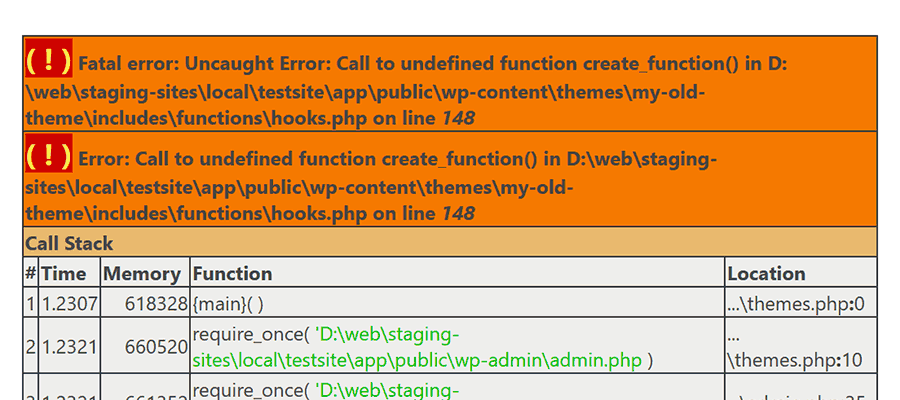
We produced the above error when running an old theme in PHP 8.2. To solve it, we asked ChatGPT for help:
Our ChatGPT Prompt:
The following PHP snippet produces an error in PHP 8.2: "Fatal error: Uncaught Error: Call to undefined function create_function()"

Please make it compatible with PHP 8.2.
Our PHP Code:
add_filter( 'wp_title_rss', create_function( '$a', 'return "";' ) );ChatGPTs Response:
The create_function() function was deprecated in PHP 7.2 and removed in PHP 8.0, which is why you're seeing this fatal error in PHP 8.2.

To make the code compatible with PHP 8.2, you should replace create_function() with an anonymous function using the modern closure syntax. Here's the updated version:
ChatGPT’s Code Output:
add_filter( 'wp_title_rss', function( $a ) {
  return '';
  } );
We edited our snippet to use the suggested code, and the error was fixed.
Modernize Your JavaScript
Does your legacy site suffer from old and bloated JavaScript? AI may have the perfect antidote.
Scripts written five or more years ago are likely dependent on an old-school library. You might, for example, remember all the glory that was script.aculo.us. A recent query shows it hasn’t been updated since 2010. Yikes!
WordPress bundles jQuery, which is still maintained. That doesn’t mean your custom scripts are using the latest code, though.
Even if an old script works, there are likely more efficient and secure options available. It might hinder performance or make it easier for a hacker to exploit your site.
AI can help you refactor your scripts to use newer libraries. You might also consider switching to vanilla JavaScript, which is more powerful than ever.
In this example, we asked ChatGPT to convert a jQuery script to vanilla JS. The script adds or removes a CSS class depending on a user action.
Our ChatGPT Prompt:
Please convert this jQuery script to use vanilla JavaScript instead:Our jQuery Code:
jQuery(document).ready(function() {

 jQuery("#sticky-sidebar").addClass(localStorage.getItem('savestickysidebar')) ;

  jQuery('#sticky-sidebar-toggle').on('click', function() {
    jQuery('#sticky-sidebar').toggleClass('hidden');

    if(jQuery('#sticky-sidebar').hasClass('hidden')){
            localStorage.setItem('savestickysidebar', 'hidden');
        }
        else{
            localStorage.removeItem('savestickysidebar');
        }
  });

  });
ChatGPT heeded our call for an independent script.
ChatGPTs Response:
Here is the vanilla JavaScript equivalent of your corrected jQuery code:ChatGPT’s JavaScript Output:
document.addEventListener('DOMContentLoaded', function() {
  var sidebar =  document.getElementById('sticky-sidebar');
  var savedClass =  localStorage.getItem('savestickysidebar');
  if (savedClass) {
  sidebar.classList.add(savedClass);
  }
  var toggleButton =  document.getElementById('sticky-sidebar-toggle');
  toggleButton.addEventListener('click', function() {
  sidebar.classList.toggle('hidden');
    if  (sidebar.classList.contains('hidden')) {
  localStorage.setItem('savestickysidebar', 'hidden');
  } else {
  localStorage.removeItem('savestickysidebar');
  }
  });
  });
Converting this script gives us one less jQuery dependency to worry about. AI made the process that much easier.
Give Old Code a New Lease on Life
Refactoring your WordPress site’s code is part of a good maintenance routine. It keeps your site safe, performant, and functional.
In days past, these tasks could be painfully difficult. You had to research, test, and write a fix. PHP and console errors were helpful, but manual labor was still required. You might spend days or weeks obsessing over a piece of unruly code.
AI tools have the potential to shorten the entire process. They can often tell you what’s wrong and how to fix it. Even if their first answer doesn’t get you 100% of the way there, they usually point you in the right direction.
So, don’t be afraid to dig into that old code. A few prompts might be all you need to give it a fresh coat of paint.
Related Topics
Apple loses key AI leader to Meta
Apple is nursing a fresh wound this week after losing one of its most crucial AI leaders to Meta. Ruoming Pang, the executive who oversaw Apple Intelligence, has jumped ship to join Meta’s new Superintelligence Labs. Pang wasn’t just any Apple employee. He led a 100-strong…